
By Bob Walsh
A few days ago thanks to Keith’s kind invitation, I talked about how the new free beta of Google’s desktop search engine can make your e-mail life easier. I say e-mail life, because odds are good if you are reading this, you spend a good part of your life answering and writing e-mail!
In this post, I’d like to share with you a simple Google/Outlook trick that will immediately improve your productivity in certain common situations.
Now, we all know Outlook’s New Item alerts are like little leaches that suck away your focus, time and attention, right?
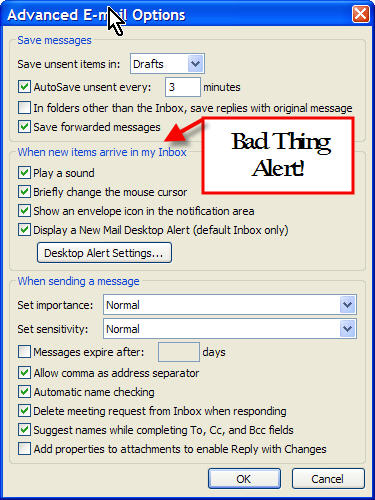
Do not do this at home; do not do this at work!
Over the past few years, I’ve seen about a dozen business executives and managers respond like Pavlov’s Dog to the ding of an incoming e-mail. The more dings, the more they could respond, the more they could do something, even though it was anywhere from a complete waste of time to responding to something they should do later.
Being a writer, a micro-ISV and a contract programmer, I can’t afford to be cattle prodded out every five minutes out as I’m coding or writing: a slew of these interruptions completely ruin a Flow (more on what I call Butterfly Stroke Productivity in a future post here.). So I’ve set Outlook to never interrupt me as a rule.
But on the other hand, there are times when you damn well better be ready to respond to an email, heads down being productive or not. So, how are you going to know about a must-read email from a client, or God Forbid, an Editor? Google Search in Sidebar mode is the answer.
Here’s a picture of part of my desktop recently. I’ve in a Flow, but I had to keep an eye out for an email I needed to respond to. Instead of letting Outlook Email Alerts out of its cage, I let Google Search morph into its Sidebar mode.
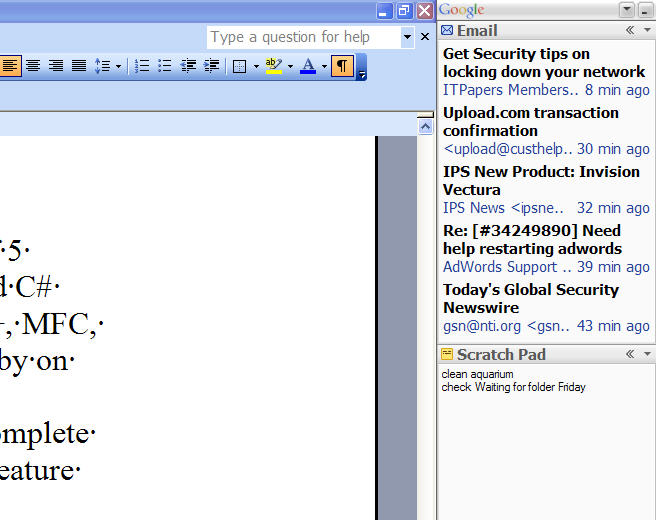
Watch, but don’t touch, your email while you’re getting things done.
With Google in Sidebar mode I could watch my email flow, but not get engaged in it until and if the email I was waiting for came by (It was the AdWords email, but that’s another story.)
Another great advantage is that I could in 10 seconds flat write a note to myself in the Scratch Pad Panel of Google’s Sidebar, then later do it if it only took a minute or add it to my MasterList Professional without breaking my concentration. Depending on what you’re world looks like, you can watch news headlines, weather, RRS feeds and IM flow by in Google Sidebar, but not lose your focus on the task at hand.
I’m dead certain that as Google pumps more developer resources into this whole Sidebar thing, this tool is going to get ever more useful. Add in Microsoft’s totally coincidental resurrection of the Sidebar in Vista and I think you’ll be seeing more of this kind non-invasive information flow management.
The worse thing you can do for your productivity is let others control your attention!
Author Bio: Bob Walsh divides his time between improving and selling MasterList Professional, a personal task management application, writing a book for Apress (Micro-ISV: From Vision to Reality) on how to start a self-funded startup, blogging here and at http://www.todoorelse.com, writing custom software applications for companies with needs and budgets and trying to remember what the words “time off” and “vacation” mean. He can be reached at [email protected].

Good point, there’s nothing worse than being interrupted by an email client all the time.
One thing though, I think your images may be in the wrong order in this posting! :-)
Hi Andrew,
Nope – first the dreaded Outlook Alerts dialog, then what Google Sidebar looks like, at least when I a) am working but b) need to watch for 1 or more emails.
Regards,
Thanks for the tip. After reading your article I did realize that I find myself constantly stopping my work flow even family time to respond to the ding.
Outlook 2003 has a pop-up mini window that appears for about 5 seconds and shows you who is sending an email and a brief summary. It achieves the same thing you’re doing here, but without the need for the Google sidebar.
Mark,
I disagree, for one reason. I choose when to look at Google SB, not the other way around.
The problem with the whole alerts user interface is what I’d call the destruction of the [desktop] commons: everyone has a good reason for their little 5 second popup; but its my productivity that gets ruined.
Just discovered Lifehacker – wow! We have the GroupWise email system installed here (no Outlook) so would it be possible to do what you are describing using GroupWise? TIA
I do agree that email auto-notifications are focus-killers – but it seems to me that Google’s side bar is not the best solution for this. Looking at your screenshot above, the sidebar contains a lot of distracting information.
Why not create a rule instead? Outlook has built-in quick rules for this:
– Display mail from someone in the New Alert Window
– Play a sound when I get messages from someone
– Send an alert to my mobile device when I get messages from someone
It takes about 5 seconds to do and it leaves you screen totally uncluttered.
Hi Thomas,
Outlook rules can work in some circumstances, such as when your boss emails you. But what if you have say 5 clients, unknown potential customers and need to to tech support for a Micro-ISV product you sell?
Then Outlook rules breaks down.
As for the Google SD’s distracting – sometimes, but I find I treat it sort of like a rear-view mirror – a quick scan every so often and if my eye catches something I’d better react to, then deal with that.
Another _free_ alternative to google desktop for non-intrusive new mail alerts: desktop sidebar (www.desktopsidebar.com). I’ve been using it at work for several months now and I’m very, very happy with it.
movistar
no se pierda el interesante caso movistar
movistar
antes de nada siempre hay algo
no se pierda el interesante caso movistar
movistar
antes de nada siempre hay algo
Carta abierta de Alejandro López Fernández con dni número: 32654324-M a
Telefónica Móviles España S.A. (telefonica moviles españa es mas
conocida por todo el mundo como movistar)
“
Queridos hijos de puta:
Acabo de recibir vuestra asquerosa carta de mierda dónde me amenazáis
para que os pague una factura de 1834,56 euros que sabéis que yo nunca
he consumido y que es totalmente injusta, sin embargo a pesar de obrar
las pruebas de lo que digo en vuestro poder, es decir en vuestros
servidores de datos, insistÃÂs en que pague, resumen:
SOIS BASURA
Mira que simpática es esta carta:
Muy Sr./a mÃÂo/a:
El saldo pendiente en su cuenta con TELEFONICA MOVILES ESPAÑA, S.A.,
correspondiente al número/s de teléfono cuyo detalle se adjunta, asciende
a la cantidad de 1834.56 euros.
Con el fin de evitar el traspaso de su expediente a nuestro
Departamento de AsesorÃÂa y de vernos obligados a comunicar su nueva situación al
Servicio de Información Crédito ASNEF/EQUIFAX [esto es una lista de
morosos], del cual somos miembros asociados, le agradeceré que el citado
importe lo haga efectivo en el plazo de quince dÃÂas a contar desde el
recibo de la presente, de alguna de las siguientes formas:
• Cheque nominativo a Telefonica Moviles España, S.A. enviado por
correo a la dirección: C/ Llodio, nº 4 – 3ª Planta. 28034 – Madrid [Este
cheque se lo pides a tu puta madre y si ella no te lo quiere dar metete
los dos puños por el culo después de arrancarte los dientes hijo de puta]
• Transferencia a los siguientes datos bancarios del banco Santander
Central Hispano (SCH): Entidad 0049, Sucursal 1500, DC 02 y Número de
cuenta 2910384121. [Por supuesto que te voy a hacer una transferencia pero
de todas las hostias que pueda darte como un dÃÂa te coja por la calle]
En ambos casos es imprescindible comunique el número de abono y
titularidad del mismo.
Para cualquier aclaración, tiene a su disposición nuestro Centro de
Atención al Cliente las 24 horas del dÃÂa [por los cojones], en los
siguientes teléfonos: 1485 (609 desde su teléfono móvil); en el caso de
empresas, el 1486 (109 desde su teléfono móvil).
Atentamente le saluda.
[Métete tu saludo por el culo pero saca los puños primero]
Miguel Angel GarcÃÂa
Gerente de Cobros [o sea el hijo de puta mayor del reino, igual que el
resto de casa de hijos de puta que es movistar]
Bueno bueno bueno
Decir que telefónica es una mierda (o que telefonica es una mierda) no
es algo nuevo, es algo que todos sabÃÂamos, pero se os ha ido la mano y
habéis logrado hincharme las pelotas, más de diez veces he llamado a
vuestros putos números de mierda para intentar arreglar esto por las
buenas y no me habéis hecho puto caso.
como dirÃÂa Palpatine…
biennnn
biennnnnnnn
biennnnnnnnnnnn
queréis guerra?
pues la vais a tener vais a lamentar el dÃÂa en el que me conocisteis
tengo mucha paciencia y mucho tiempo (o eso creo) para joderos, hasta
el último puto gato en españa se va a enterar de lo ladrones hijos de
puta que son en movistar, y por cierto ¿que me quereis meter en una lista
de morosos por un puto telefono movil o teléfono móvil? pues me metéis
me suda mucho la polla mi poder no es tan banal como creéis y si no al
tiempo
bueno queridos hijos de puta de movistar empieza el juego nos
encontraremos por el camino, no tendré piedad si algún dÃÂa me cruzo con vosotros
en la calle os voy a meter una bombona de butano por el culo asàque
mejor no os crucéis conmigo
y por cierto, una nota aclaratoria para el presidente de movistar, ¿no
te da vergüenza dirigir una compañÃÂa de MIERDA? yo te respondo, claro
que no te la da PORQUE ERES MIERDA
PostData: querido presi de la compañÃÂa de mierda, el azar te libre de
que te eche el guante porque te mato a hostias, después de todo lo que
te voy a hacer vas a pedirme llorando que te mate
“
¿Pero de que va todo esto? (Por Traksler) (¿caso movistar? no, no creo)
Bueno yo soy un coleguilla de Alejandro y me ha tocado la ardua tarea
de explicaros a quien le pueda interesar de que coño va todo este
marrón. Me vais a perdonar que firme con pseudónimo pero es que aquàva a
haber tiros y esto a mi ni me va ni me viene. Yo sólo soy el mensajero.
Bien la cosa va de lo siguiente.
Cómo todos o casi todos sabéis Telefónica de España como su propio
nombre indica es una compañÃÂa que se dedica a prestar servicios de
telefonÃÂa en España. Uno de sus “satélites” es movistar que se dedica a la
telefonÃÂa móvil
Pues bien, Alejandro hace un tiempo contrató con movistar un servicio
de conexión a internet a través de teleléfono móvil, es decir lo que
conocemos como “conexión wireless umts”.
Es decir, tu tienes un teléfono móvil normal y corriente (o una tarjeta
modem móvil) y con ese teléfono móvil en vez de hablar lo que haces es
conectarlo a tu ordenador portátil y ya puedes conectarte a internet.
Es una experiencia muy gratificante irte a la playa o a lo alto de un
monte, con tu ordenador portátil y tu teléfono móvil y poder chatear,
mirar tu correo o buscar algo en el google.
Hasta aquàtodo correcto pero que pasó?
Lo que pasó es que este tipo de conexiones a internet a través de
teléfonica tienen un riesgo grande, y es que te cobran por la cantidad de
datos que recibes y envÃÂas a internet (y no por el tiempo de conexión
como en una ADSL normal).
Es decir, tienes una tarifa plana en la que pagas 59 euros por
transferir a la red hasta un giga de información y a partir de ahàempieza a
cobrarte por kilobyte (y a cobrar mucho por cierto).
Lo que le pasó a Alejandro es que un virus (un gusano, del tipo
SYN_SENT al puerto 445) se coló en su ordenador durante 3 dÃÂas, y el virus se
puso a enviar información, e información y mucha más información, hasta
que el giga fue rebasado muy ampliamente y duplicado varias veces. De
ahàla monstruosa factura.
Esa factura es indebida. Alejandro no consumió ese ancho de banda. Lo
consumió un virus maligno y no él.
Afortunadamente Alejandro es un doctorando en informática y se dio
cuenta a tiempo y pudo eliminar al agente maligno, pero el daño ya habÃÂa
sido hecho.
Por otro lado, si Alejandro no fuese informático profesional la factura
podrÃÂa haber sido de 12.000 euros o más…
Movistar con toda seguridad debió ver en la monitorización de sus
servidores que algo raro estaba ocurriendo porque de gastar 59 euros todos
los meses, el consumo se disparó sin justificación un 3000 por ciento,
pero Movistar se quedó calladita como las putas dejando que la factura
siguiese engordando.
Alejandro no fue informado en ningún momento de que LA LEY OBLIGA a que
exista la posibilidad de que si tu factura en euros pasa de cierta
cantidad se pare el servicio para que no siga aumentando el gasto (lo que
se conoce como LIMITE DE CONSUMO). AparecÃÂa por la parte de atrás del
contrato en letra microscópica de esa que no se puede leer sin un buen
par de gafas graduadas. Ni Movistar ni sus esbirros informaron
explÃÂcitamente y con transparencia de esto a Alejandro, Movistar se quedó callada
como las putas.
Alejandro se prestó a entregar los logs (archivos dónde se guardan
datos de lo que ha pasado dentro de un ordenador) donde se probaba
fehacientemente la actividad de un virus (corroborable mediante prueba cruzada
con los distintos servidores) en las horas indicadas de “supuesto
consumo” pero nadie lo quiso ver, simplemente no le hicieron caso. Sólo le
dijeron que pagase: como las putas. Eso es lo que te dice una puta:
“paga y no me cuentes tu vida”.
Que sÃÂ, que yo también estoy de acuerdo, movistar sois una casa de
putas.
PostData: Vodafone no es mejor, también son unos chapuceros, ellos y
sus telefonistas “sudamericanos” (por qué será?); pero dentro de lo
chapuzas que son no son tan odiosos como estos otros y en algunas cosas
funcionan cien mil veces mejor.
caso movistar
Where do i download